COBOL · Copybooks · JCL · CICS · VSAM · DB2

From COBOL to modern data pipelines

Programs, copybooks & JCL — lineage and automated conversion.10X SPEED

Python Polars PySpark SQL Snowflake Databricks More
Short demo video

COBOL · Copybooks · JCL · Parser Engine

Everything MigryX ingests from COBOL systems, the engine that converts it, and every target it produces.

COBOL Programs & Assets
  • COBOL source programs (.cbl, .cob)
  • Copybooks — shared data definitions (.cpy)
  • JCL — Job Control Language
  • CICS transaction programs
  • VSAM file definitions (KSDS, ESDS, RRDS)
  • DB2 embedded SQL (EXEC SQL)
  • IMS DB/DC definitions
  • Batch programs & subroutines
  • SORT/MERGE utility control cards
Data Sources & Mainframe Assets
  • DB2, IMS, VSAM, QSAM
  • Sequential files, GDGs
  • Flat files, EBCDIC datasets
  • IDMS, Adabas, Natural
  • MQ Series, CICS queues
  • Mainframe catalog entries
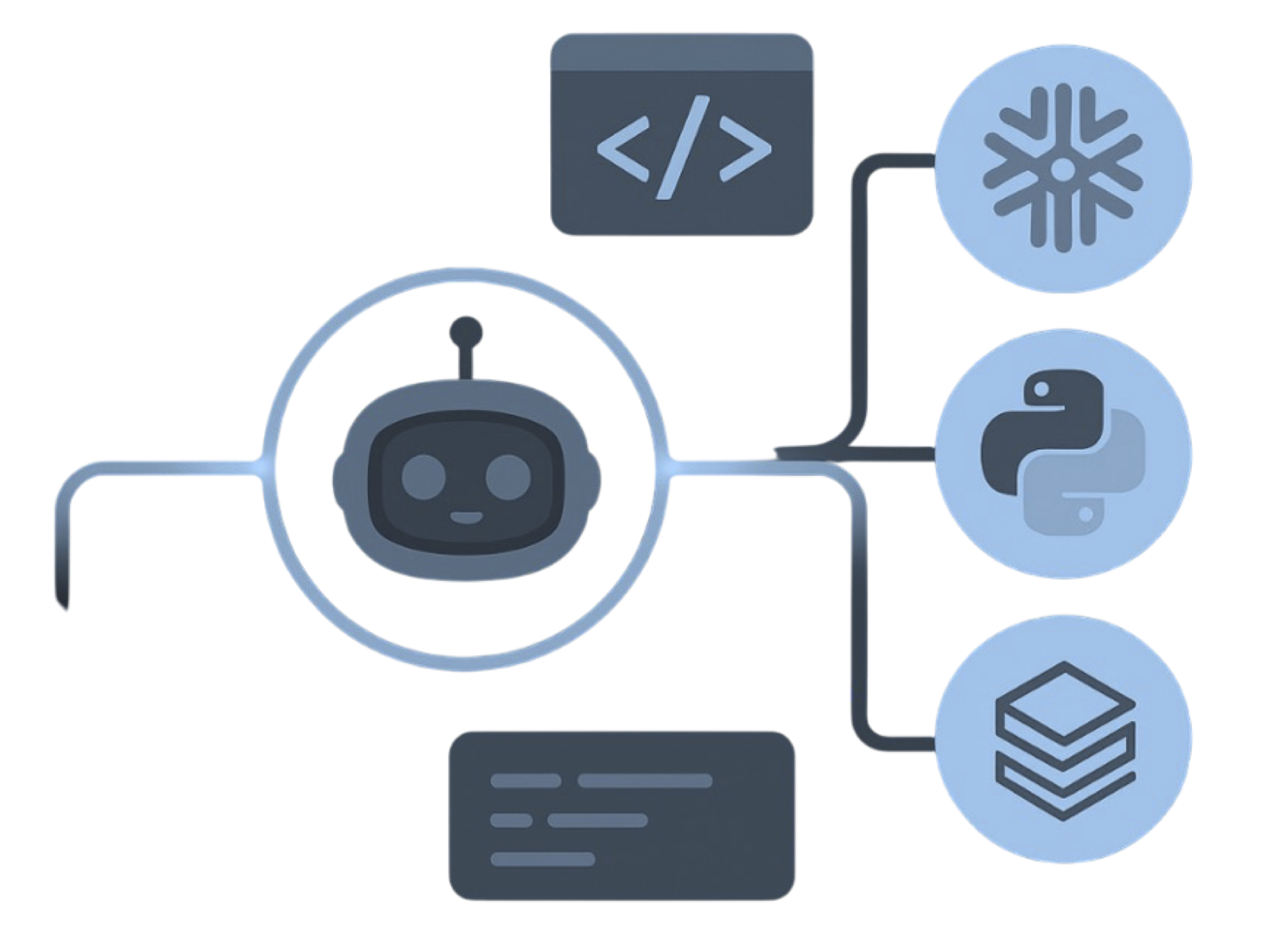
MigryX parser engine
MigryX Parser
Deployment
  • dbt
  • Airflow
  • Openflow
  • Git / CI
Python Ecosystem
  • Python (Polars)
  • PySpark
  • Snowpark
  • Databricks
  • Dataproc
  • Fabric
  • EMR
SQL & Modern Warehouse
  • Snowflake SQL
  • Databricks SQL
  • BigQuery
  • Fabric
  • Redshift
  • Teradata
  • Iceberg

Migration Process

Analyze and Insights
  • Automatic assessment of COBOL programs, copybooks, and JCL for rationalization and migration planning
  • Comprehensive dependency mapping with data and file lineage across programs and copybooks
  • Development of required frameworks and standards for COBOL-to-Python/SQL conversion
  • Workflow complexity analysis covering CICS, batch, DB2, and VSAM patterns
  • Rationalize and standardize COBOL program patterns and reusable copybook structures
Convert and Migrate
  • Automated translation of COBOL programs to Python (Polars/PySpark) and SQL with modernization
  • Copybook-to-schema conversion for Snowflake, Databricks, and cloud targets
  • JCL-to-orchestration conversion (Airflow, dbt, CI/CD pipelines)
  • VSAM/DB2/IMS data access patterns converted to modern SQL and DataFrame operations
  • Native integration with DBT, Airflow & Git for orchestration
Test and Validate
  • End to end automated testing of converted data pipelines
  • Comprehensive data validation and copybook schema mapping
  • Side by side output comparison between mainframe and target
  • Test data generation and cutover preparation
  • Partitioned validation with automated error detection
🚀 Go Live and Hyper Care Streamlined transition with dedicated support and monitoring to ensure optimal performance
🧭
Compass
Migration Intelligence Platform

Understand Your COBOL Estate Before You Migrate

Compass scans your COBOL footprint — .cbl and .cob programs, .cpy copybooks, JCL, CICS transactions, VSAM definitions, and DB2 embedded SQL — then classifies each asset as MIGRATE, ARCHIVE, or DELETE. Convert only what matters. Archive the rest. Delete the noise.

The Migration Challenge

COBOL estates grow for decades — millions of lines of code, shared copybooks across hundreds of programs, complex JCL job streams, and unclear dependencies between batch and CICS. Migrating off the mainframe without inventory is high risk.

📊 Massive Scale

Hundreds of thousands of files with no visibility into what's actively used.

💸 Mounting Costs

Legacy licenses and storage costs growing — much of it stale, unused data.

❓ Unknown Dependencies

Complex web of programs and datasets. What connects to what is a major challenge.

⚠️ Migration Risk

Can't migrate everything at once. Need data-driven decisions, not guesswork.

🕒 Time Pressure

Manual analysis takes months. Business needs a clear, prioritized plan — fast.

📉 No Visibility

Which assets drive value? Which are technical debt? Unknown without automation.

Compass Solves This

One system to scan, score, and classify every COBOL asset automatically — from source programs and copybooks to JCL job streams and DB2/VSAM access patterns.

🔍

Complete Inventory

Automated scanning of every file, every program, every execution log. Build a comprehensive catalog with metadata, dependencies, and usage patterns.

🎯

Smart Recommendations

Intelligent scoring engine evaluates each asset on multiple criteria. Get clear MIGRATE, ARCHIVE, or DELETE decisions with phased priorities.

📊

Dependency Mapping

Parse code to extract relationships and external references. Understand full impact before making any change.

💰

Cost Optimization

Identify archival and cleanup opportunities. Project savings across storage, licensing, and cloud migration costs before committing.

Intelligent Classification Logic

Multi-factor scoring balances cost reduction with migration speed

✅ Increases Migration Priority

  • Recent access — used in last 6 months
  • High frequency — accessed regularly in execution logs
  • Small size — easy to migrate quickly and cheaply
  • SQL-heavy — simpler, faster conversion path
  • Low complexity — fewer dependencies, lower risk
  • Error-free — clean execution history, no fixes needed

⚠️ Decreases Migration Priority

  • Stale data — no access in 2+ years → ARCHIVE candidate
  • Never used — zero execution in logs → DELETE candidate
  • Large files — higher migration cost and risk, later phases
  • High complexity — many dependencies, careful planning needed
  • Execution errors — must be fixed or reviewed before migration
  • Orphaned — no dependents found → safe to delete
Classification Output
5
MIGRATE — Critical
High value, low effort → Phase 1
Daily reports, frequently accessed data, SQL-heavy code, business-critical assets
3–4
MIGRATE — Standard
Active workloads → Phase 2–3
Regular usage, moderate complexity, important but not critical
A
ARCHIVE
Move to cold storage — reduce licensing costs
Not accessed recently, historical/compliance data, low business value
D
DELETE
Safe to remove — immediate savings
Duplicates, orphaned files, test data, never executed

Typical Customer Outcomes

What teams discover when they inventory COBOL programs, copybooks, and JCL before a platform change

60–80%
Data Reduction
Archive or cleanup candidates
5–10×
Analysis Speed
vs. manual assessment
Hours
To Complete Scan
Not weeks or months
100%
Asset Coverage
Complete inventory visibility
Built for Enterprise Scale Production-ready. Handles real-world complexity.
01

File Scanner

High-performance parallel processing. Hashing detects duplicates automatically.

02

Code Parser

Parses COBOL divisions, copybook layouts, PERFORM chains, embedded SQL, and CICS commands with high accuracy.

03

Log Analyzer

Parses execution logs to track usage patterns, errors, and performance.

04

Usage Tracking

Evidence-based decisions: which assets are active vs. never accessed.

05

Migration Scoring

Multi-factor algorithm: usage, recency, size, complexity, execution quality.

06

Phased Planning

Priority-based phase assignment optimized for risk and business continuity.

07

Rich Reports

Executive dashboards, migration plans, cost projections, exportable data.

08

Queryable Database

All analysis stored structurally. Run custom queries for any ad-hoc need.

Simple Process. Powerful Results.

From deployment to actionable migration intelligence — fast.

1

Configure & Scan

Point Compass at COBOL source directories, copybook libraries, JCL PROCs, or source-control checkouts. Automated scanning begins immediately.

2

Analyze & Score

Parse COBOL divisions, copybook includes, JCL steps and PROCs, analyze execution logs, build a dependency graph. Score every program for priority.

3

Review & Decide

Interactive reports show exactly what to migrate, archive, or delete.

4

Execute & Save

Follow the phased plan. Track progress and realize immediate cost savings.

Analyze. Inventory. Lineage.

Scan COBOL programs (.cbl, .cob), copybooks (.cpy), and JCL to build a complete inventory. Discover PERFORM chains, CALL dependencies, copybook includes, DB2/VSAM access patterns, and CICS transaction flows — plus program-to-program call graphs. Produce visual lineage and impact maps that guide the entire migration.

  • Inventory programs, copybooks, JCL jobs, and data assets
  • Dependency mapping with visual lineage (programs + copybooks + data)
  • Complexity and usage signals from source analysis and JCL logs
InventoryLineageComplexityValidationRisk
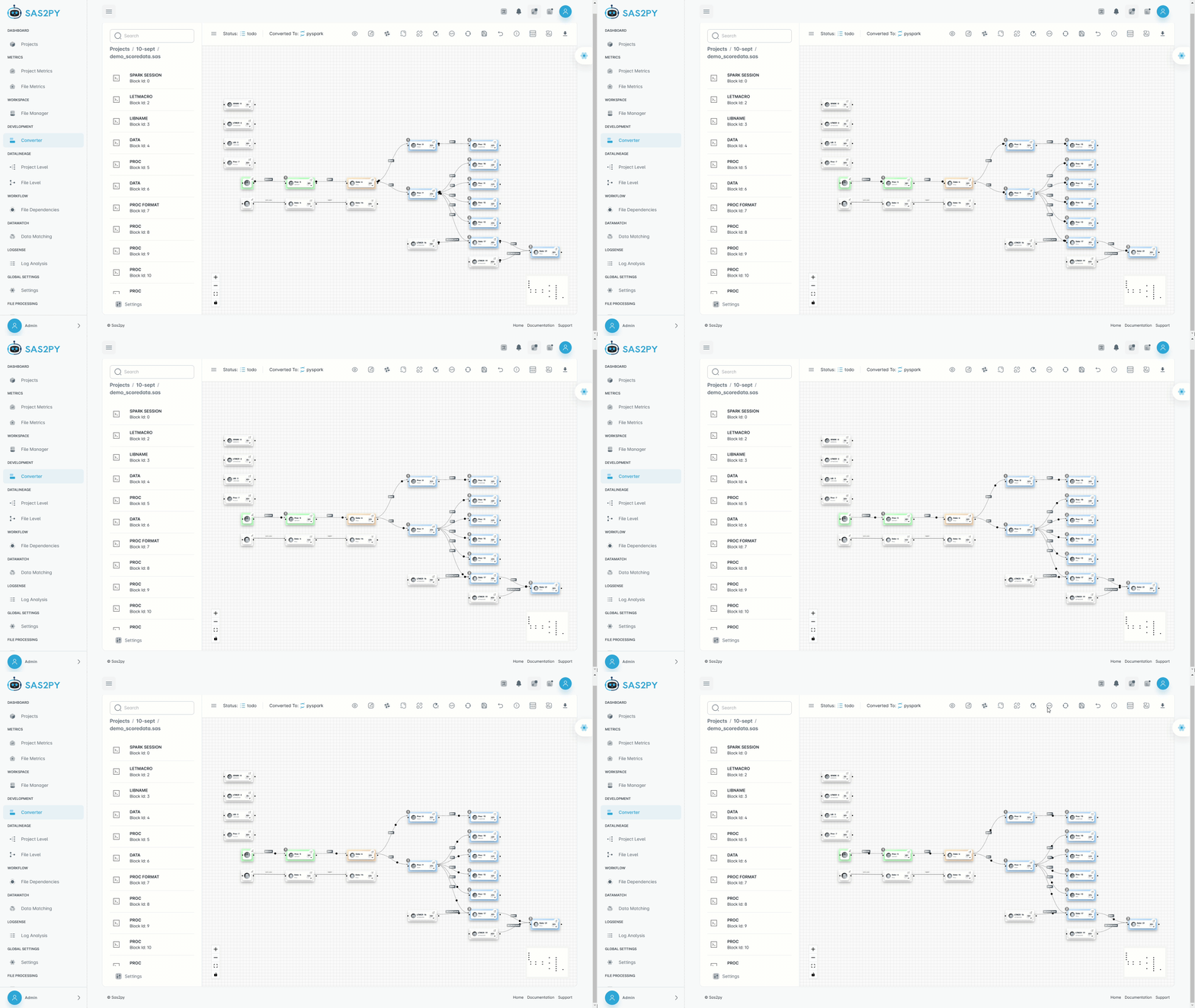
Visual lineage map
Visual lineage. Precise dependency graph.

Convert. Generate modern code.

Parser conversion turns COBOL program logic — PERFORM chains, copybook layouts, embedded SQL, VSAM I/O, and CICS commands — into Python (Polars/PySpark) and SQL for Snowflake, Databricks, BigQuery, Redshift, and Fabric. JCL is converted to orchestration. All translations are explainable and auditable.

  • Interprets COBOL divisions, copybook structures, and DB2/VSAM access for matched outputs
  • Copybooks converted to schemas; JCL to orchestration pipelines
  • Auto documentation for each converted artifact
PythonPolarsPySparkSQLJCL→OrchestrationAuto docs
Targets we generate
Python and PySpark. Snowpark and SQL.

Execute. Orchestrate pipelines.

Run converted workloads in the right order with a driver notebook or job runner. Standardize on Delta and cloud storage, schedule, monitor, and auto retry with centralized logs and metrics.

  • Visual execution on Databricks, Snowflake
  • Native integration with DBT, Airflow, Git
  • Validate results and capture lineage
Visual orchestrationSchedulingRetriesLogsCI ready
Execution orchestration
Visual execution with centralized logs.

Validate. Prove parity.

Partitioned validation compares row level and aggregate outputs between legacy and modern systems. Automatic schema checks, data matching reports, and exception trails give confidence to go live.

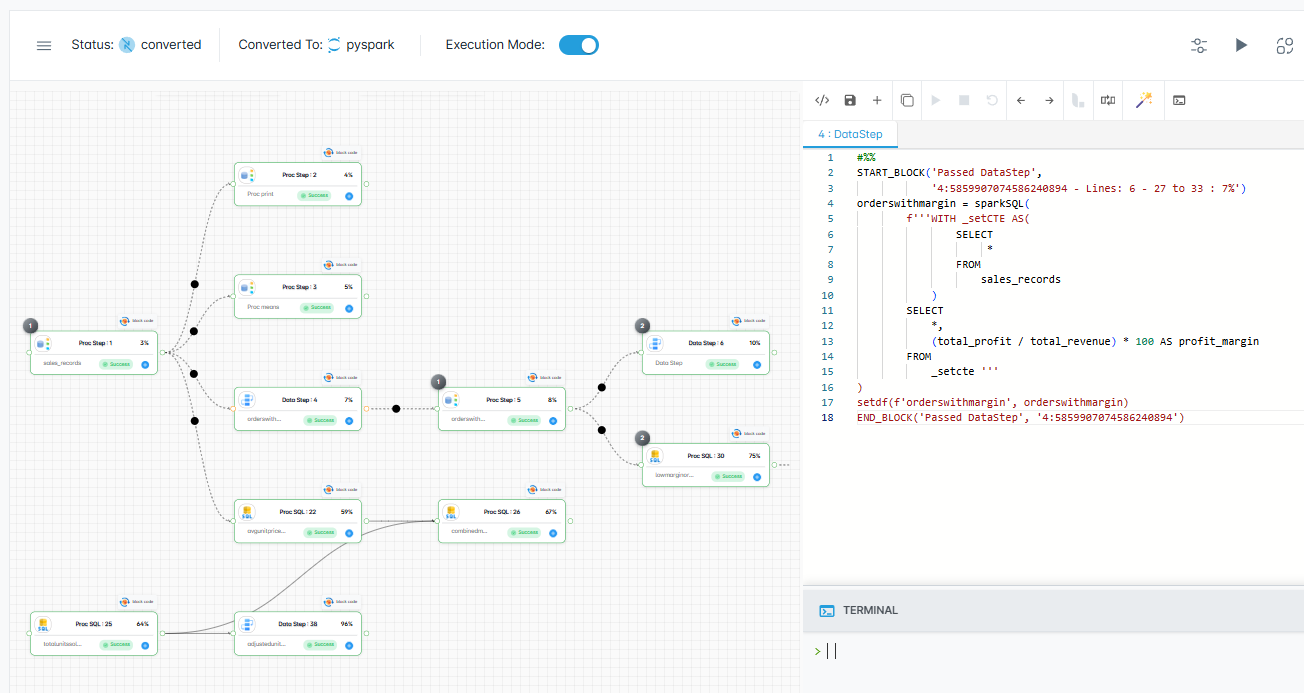
  • Visual execute to Snowflake and Databricks. Shows Visual lineage along with the live code in a direct session. You see each step and the exact stop point.
  • Streamlines troubleshooting, cuts retesting, provides audit ready logs, lowers engineering and compute costs.
  • Lower risk. Visual Lineage shows upstream and downstream impact, so teams retest only what matters.
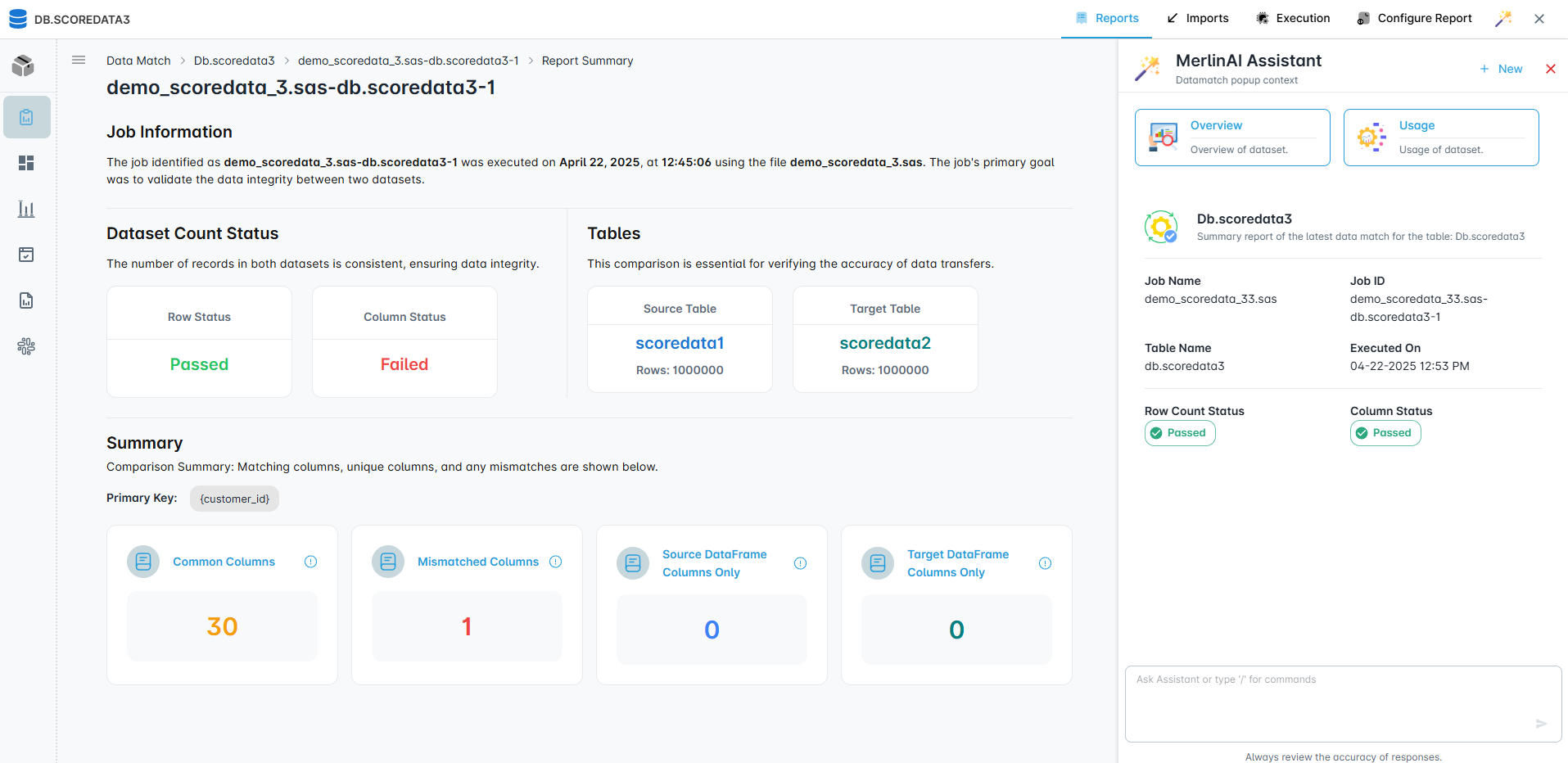
Row countsCommon columnsMismatched columnsEvidence
Data matching validation
Data matching. Evidence your stakeholders trust.

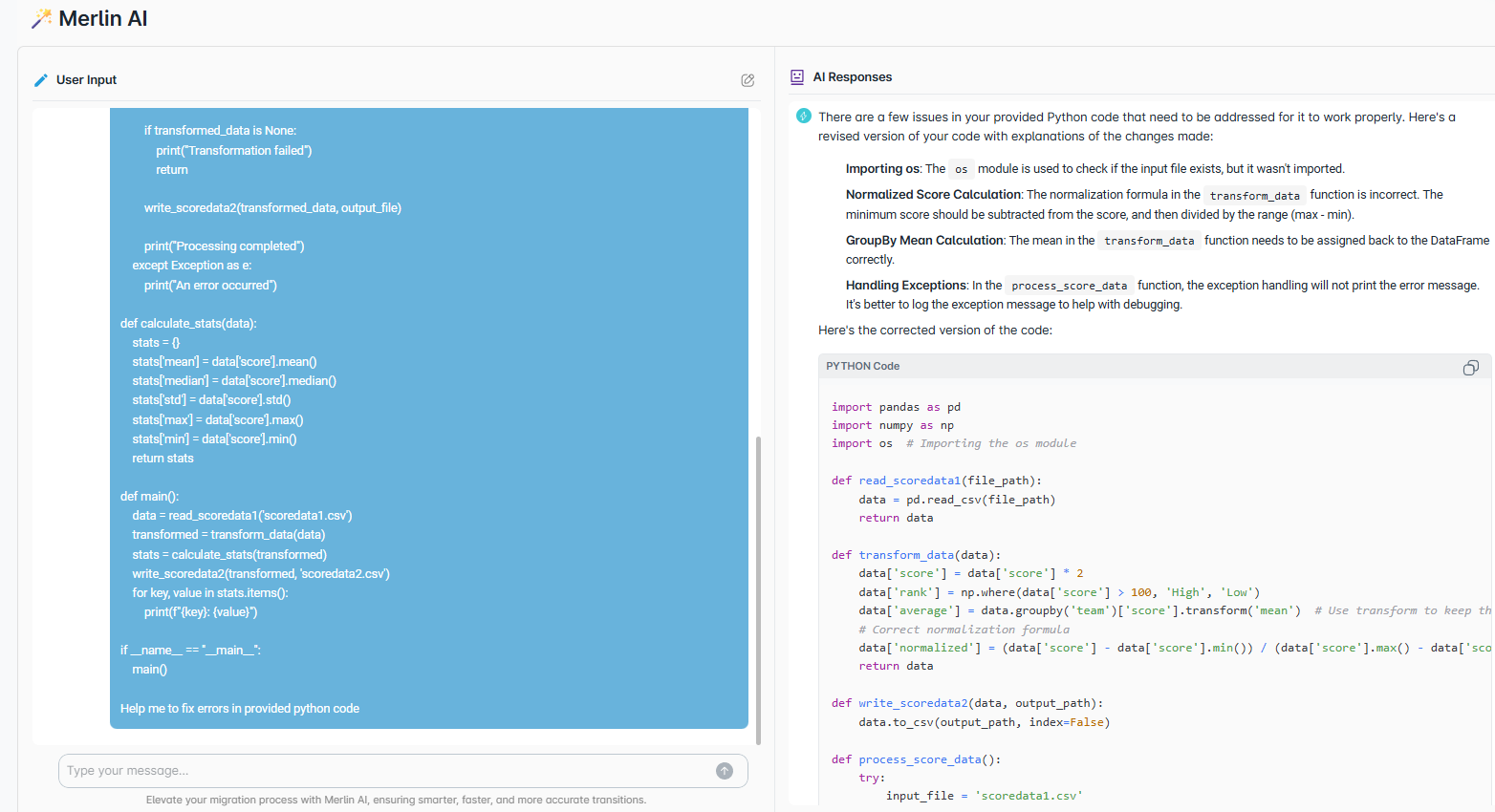
Merlin AI. Assist and accelerate.

Context aware assistance that knows your inventory, lineage, and conversion plans. Generate unit tests, explain diffs, suggest mappings, and draft notebooks with your rules applied.

  • Inline explanations for converted modules
  • Debug errors, and improve efficiency
  • Enterprise safe. Runs in your environment
Inline explainsMapping assistTest scaffoldSecure in your env
Merlin AI assistant
Developer assist powered by your context.
Execution

Visual Execution

Visual execution runs converted COBOL workloads directly on Snowflake and Databricks, combining lineage and live code in one workspace with a direct warehouse session and step-by-step visibility to any failure point.

  • Visual execute to Snowflake and Databricks. One view shows visual lineage along with live code with a direct session. You see each step and the exact stop point.
  • Streamlines troubleshooting, cuts retesting, provides audit ready logs, lowers engineering and compute costs.
  • Lower risk. Visual Lineage shows upstream and downstream impact, so teams retest only what matters.
Visual Execution on Snowflake and Databricks
Modules

COBOL migration across the full lifecycle

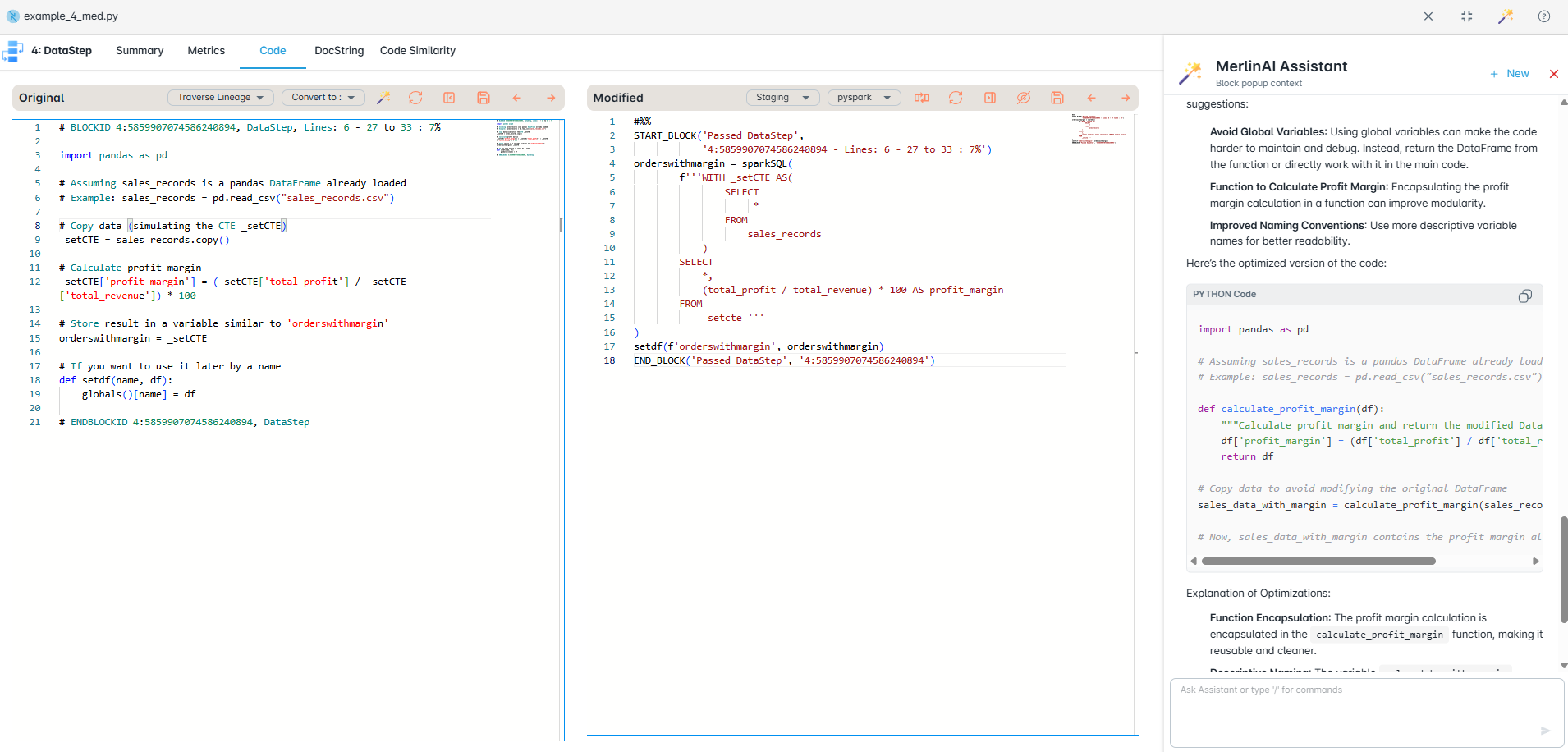
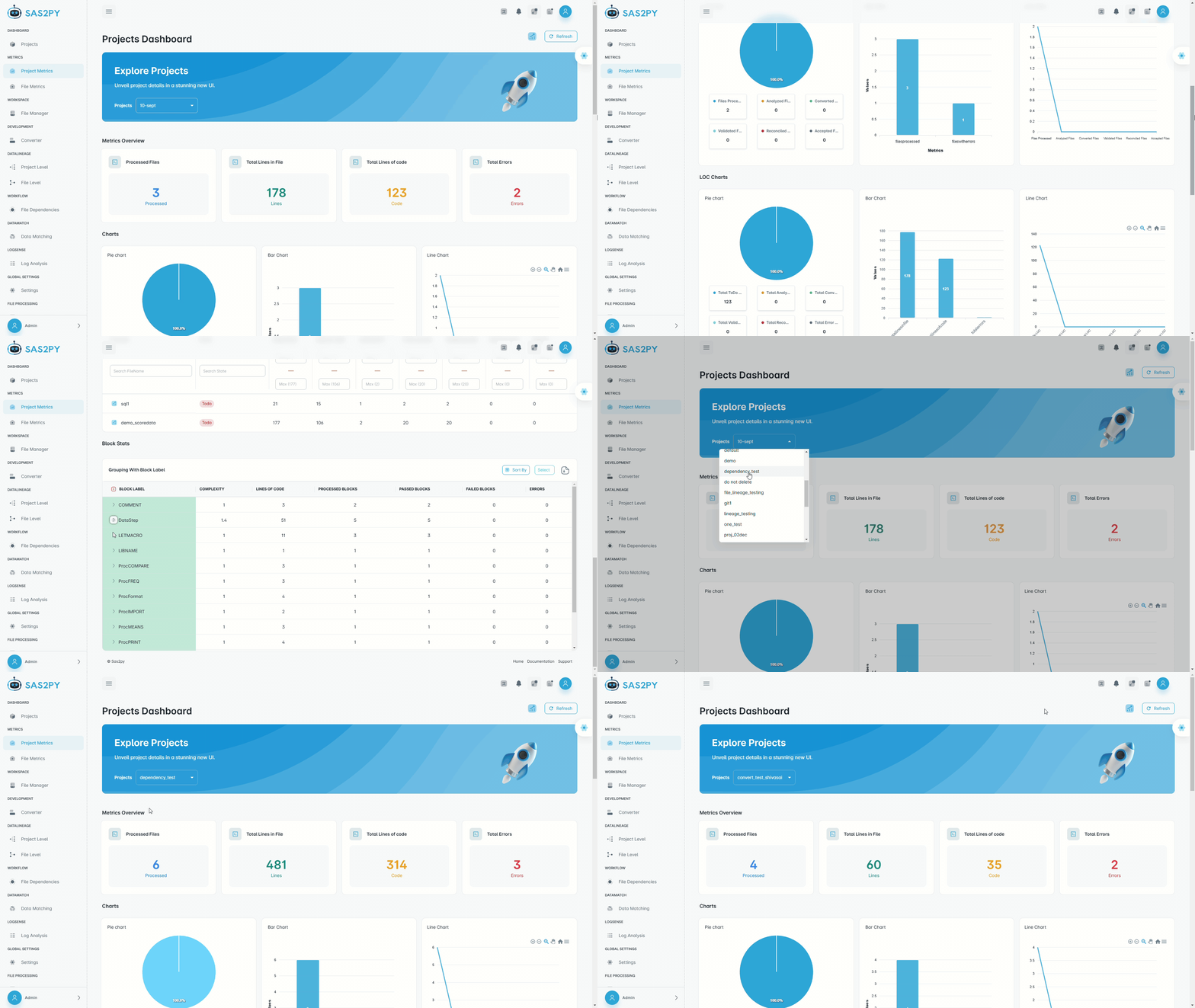
COBOL program analysis dashboard
Code Analysis

Assess COBOL programs, copybooks, and JCL across the estate, map complexity across PERFORM chains, DB2/VSAM access, and CICS transactions, and flag readiness. Get clear scope, a prioritized plan, safer cutovers, and faster production.

COBOL lineage visualization
Visual Lineage

Visualize program calls, copybook includes, DB2/VSAM access, and JCL job flows. Speeds impact checks, lowers migration risk, supports audits, and proves outputs match.

Automated COBOL conversion to Python and SQL
Code Conversion

Convert COBOL programs into Python (Polars/PySpark) or SQL with matched outputs — preserving business logic, copybook structures, and data access patterns. When possible, convert directly to SQL for Snowflake/Databricks migration. Modernize faster, keep logic intact, and avoid risky rewrites.

Jupyter notebooks for validation and development
Data Mapper

Automatically map COBOL copybook layouts (PIC clauses, REDEFINES, OCCURS) to Snowflake or Databricks schemas. Cut migration risk, enforce naming and data types, and get audit-ready visibility.

Generated documentation example
Auto Docs

Automatic documentation captures your COBOL programs and the new target code, detailing program structure, copybook usage, JCL job flows, and cross-program dependencies for clear traceability.

Data Matching reports and reconciliation
Data Matching

Compares source and target outputs at scale using configurable keys and rules. Flags mismatches, duplicates, and gaps with actionable reports for fast fixes.

Source: COBOL / Mainframe

This page is dedicated to migrating COBOL assets — programs (.cbl, .cob), copybooks (.cpy), JCL, CICS transactions, VSAM definitions, and DB2 embedded SQL — into modern Python, SQL, and cloud targets. Need other legacy engines? See the full platform.

COBOL Programs
Batch & CICS programs, subroutines (.cbl, .cob)
Copybooks & JCL
Shared data definitions (.cpy), job control, PROCs
Runtime & Catalog
Schedules, GDGs, VSAM catalogs, execution logs

Targets we generate

Python (Polars/Pandas), PySpark, SQL, Snowflake/Snowpark, Databricks, and cloud platforms.

PySpark
Distributed DataFrame and SQL workloads
Snowpark
Python APIs for Snowflake compute
Databricks
Delta Lake pipelines and notebooks
Dataproc
Managed Spark on Google Cloud
Fabric
Microsoft Fabric Lakehouse and pipelines
EMR
AWS EMR Spark and Hive workloads
Cloudera
On‑prem or hybrid Hadoop distributions
Deployment

Simple, secure, on premise deployment

Everything runs inside your network. No external connections. No data leaves your environment in any scenario.

Security posture

  • Fully air gapped operation supported.
  • Outbound connections none. External API calls none.
  • All processing occurs inside the container and host network.
  • SSL for VS Code, Jupyter, nginx proxy, and backend API.
  • Local PostgreSQL only. Logs stored on local disk.
DIY & Self-Service

No consultants. No waiting.

Deploy MigryX yourself, run the pilot on your own schedule, and keep every COBOL program, copybook, JCL, and converted artifact inside your network.

One-command install
Docker or Windows VM — running in under an hour. No vendor hand-holding required.
Air-gapped & private
No outbound connections. No external API calls. Source code and data stay entirely on your infrastructure.
Run on your own timeline
Start, pause, and iterate the conversion yourself. No engagement contracts needed to see real results.
Self-Service Pilot Options

Run the Pilot Yourself

No consultant. No RFP. Install MigryX in your environment, convert real COBOL programs and JCL, and see results — on your own terms.

Self-service. No consultant needed.Deploy yourself in under an hour
Convert. Generate modern code.Run on your own schedule. Iterate freely.
All data stays in your network.Air-gapped capable. Zero external calls.

Migration Readiness

1 week

Discovery & Insights

  • Scope: 100K LoC - Unlimited
  • Deliverables: Inventory workflows, macros, and configs. Map dependencies with visual data and file lineage. Analyze complexity with block labels and LoC.
  • Reports: Inventory, visual lineage, and risk assessment. share via HTML reports
  • Access: Self-service. No consultant required. Runs entirely in your environment.

Full Pilot

4 to 6 weeks

End-to-end

  • Scope: Discovery, plus 10K LoC across legacy programs or workflows.
  • Deliverables: Discovery, plus pilot code conversion and data matching to the target system.
  • Reports: Discovery, plus data matching, validation and enterprise data workflows.
  • Access: Self-service. No consultant required. Runs entirely in your environment.

Large Scale Pilot

2 to 4 months

Enterprise

  • Scope: Same as end-to-end, but with larger sets of legacy data and programs for discovery, convertion, validation and execution to modern workloads.
  • Deliverables: Same as end-to-end
  • Reports: Same as end-to-end
  • Access: Self-service. No consultant required. Runs entirely in your environment.
Type Migration Readiness Full Pilot Large Scale Pilot
Discovery 100,000 LoC 100,000 LoC 1 Million LoC
Conversion N/A 10,000 LoC 100,000 LoC
Duration 1 week 4 to 6 weeks 2 to 4 months
Deliverables Project reports
Risk analysis
Full reports
Executed code
Full reports
Executed code
Reports Inventory,lineage,risk Full project Full project and JCL
Execution In your environment In your environment In your environment

These pilots are fully self-service — install, run, and evaluate independently inside your own environment. No external consultants required. Pricing and scope can be adjusted to match complexity and urgency.

Reports

Project Reports and JCL Reports

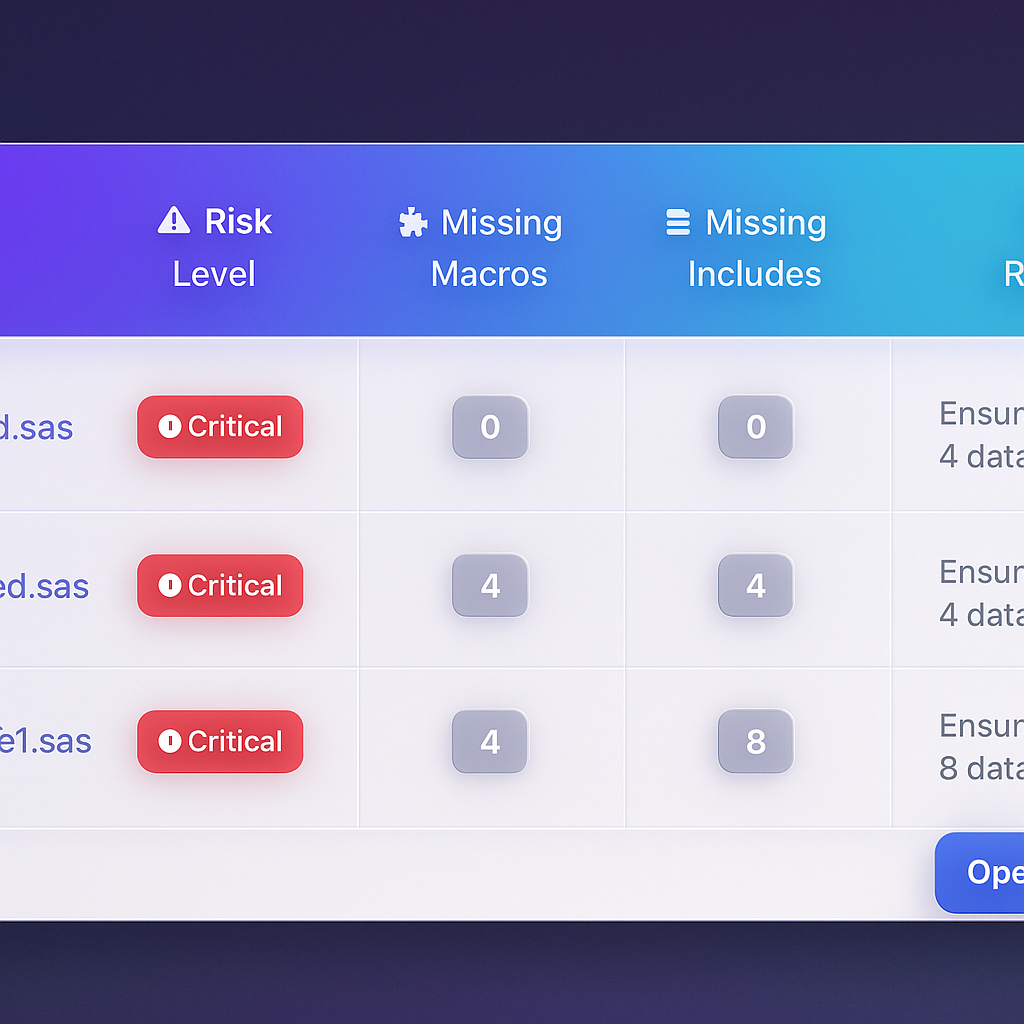
Project Reports

A compact view of what exists, how it connects, and where risk lives.

Inventory Lineage Complexity Validation Risk
  • Inventory summary. Files and jobs counted. Macros and includes detected. Datasets referenced.
  • Dependency map. Fan in and fan out. Critical hubs identified. External calls flagged.
  • Complexity and risk. Pattern difficulty score. Unsupported items. Remediation priority.
  • Validation status. Errors and warnings. Coverage progress. Open issues.

JCL Reports

StepsPROCsDD statementsSchedulesDatasetsReadiness

End to end view of JCL structure, datasets, and run control with conversion readiness.

  • Job flow. Step order. PROC usage. Condition codes.
  • Datasets and lineage. Reads and writes. Temporary and persisted. Upstream and downstream.
  • Control and schedule. Triggers and dependencies. Calendars if present. Restart points.
  • Conversion readiness. Unsupported patterns. Parameterization needs. Proposed target control.

Datasheets

Architecture

How MigryX fits your COBOL migration

Deployment

Install on your servers or VMs. Optionally deploy inside Kubernetes or OpenShift. Use private cloud networks only.

Connectors

Secure connectors to Snowflake, Databricks, BigQuery, and Redshift. Keys managed by you.

Storage

Project data stored inside your boundary. Logs and evidence live in your storage accounts.

Security and compliance

Private by design. You hold the keys.

Data residency

Run on premise or inside your private cloud. No data leaves your boundary.

Access control

Role based access. SSO and MFA integration. Fine grained permissions.

Auditability

Every action is logged. Evidence packs for internal and external reviews.

Governance

Templates, naming, and coding standards enforced at generate time.

Backups

Project backup and restore under your policies.

Isolation

No shared services. Your environment only.

FAQ

Answers to common questions

Where does MigryX run

Inside your environment. On your hardware or private cloud. You hold the keys.

What code is produced

Python (Polars/PySpark), SQL, DBT models, and Databricks notebooks with comments and mapping sheets. COBOL logic converts to SQL when possible for direct Snowflake/Databricks deployment.

How do we prove results

Validation reports and Data Matching show parity between mainframe outputs and modern targets. Approval records provide evidence for audits.

Can I see a demo?

Absolutely. Book a live walkthrough where we parse your own COBOL programs in real time and show you converted output, lineage, and validation results.

What about JCL and orchestration

JCL is converted to Airflow DAGs, dbt pipelines, or CI/CD workflows. Integrate with ADF, Composer, or Control M. Keep existing schedules or modernize them.

How do we start

Begin with the pilot. Load a sample of COBOL programs and JCL. Review lineage, conversion, runs, and validation. Scale with confidence.

Contact

Talk to our team

Questions about COBOL migration? Tell us about your estate and target platform.

Schedule a Demo

See MigryX parse your own code in a live walkthrough.

Book Time →

Request a POC

Submit your migration details and get a free proof of concept.

Start POC →
hello@migryx.com Indianapolis • Boston • Hyderabad
MigryX
Modernize faster
  • Start a pilot
  • Runs in your environment
  • End-to-end pilot